

YouTube is one of the largest video platforms in the world. Millions of people use it every day to watch and create content.
For creators, this offers real income opportunities. But making money on YouTube takes time. And it can be daunting to get started if you have no experience creating content online.
In this guide, you will learn six practical ways to make money on YouTube.
How to Make Money on YouTube
- Optimize Your YouTube Channel for Maximum Visibility
- Join the YouTube Partner Program (YPP)
- Sell Custom Merchandise
- Use Affiliate Marketing Links
- Get Paid Brand Sponsorship Deals
- Live Stream to Boost Supers
1. Optimize Your YouTube Channel for Better Visibility
If you are just starting, your channel setup matters. It helps people find you. It also helps them decide whether to subscribe.
A strong foundation makes growth easier later.
Select a Clear and Sustainable Niche
There are many popular content categories on YouTube, including:
- Gaming
- Technology
- Finance
- Business
- Cooking
- Makeup & beauty
- Pets & animals
- Fitness
- Sports
- Music
- Comedy
You don’t need to pick the “perfect” niche. But you should choose one direction.
If you are unsure what your channel should focus on, spend time exploring different ideas. Your niche can influence your channel name, content style, and target audience.
When choosing a niche, consider the following questions:
- Can you offer a unique perspective or format?
- Are you interested in the topic?
- Can you create useful or engaging content about it?
- Is there an active audience for this topic?
Most niches already have competition. That is normal and should not stop you from starting. What matters more is your angle. You need a reason for people to watch you.
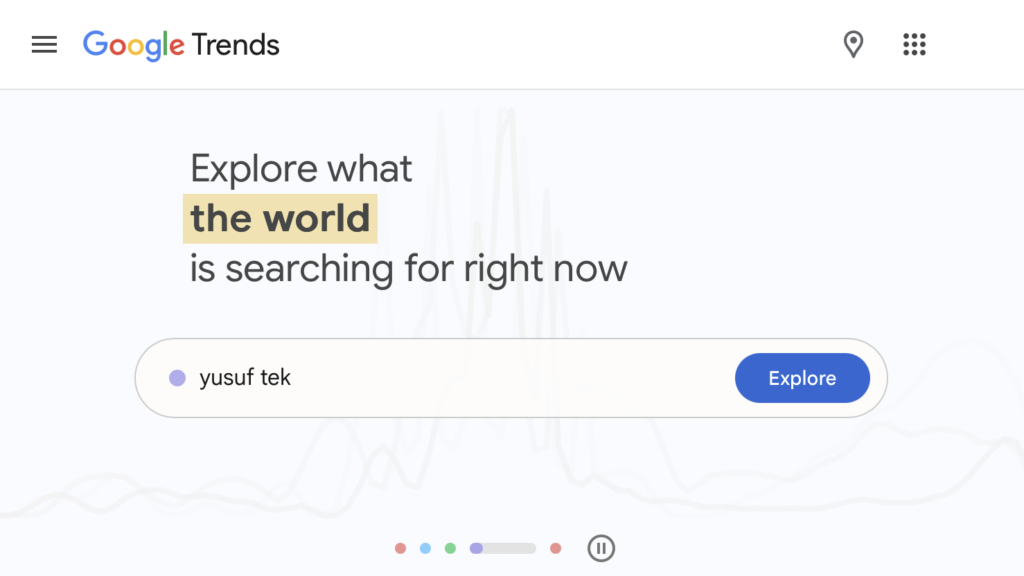
You can explore search trends using tools like Google Trends or YouTube search suggestions. This may help you identify growing interests and seasonal topics.
Pick a Memorable YouTube Channel Name
Your channel name is not the most important factor for success. But it still matters.
It helps viewers recognize your content and remember your channel.
A good channel name should be:
- Simple
- Easy to remember
- Match your content or style
Avoid using random numbers unless they have a clear meaning. For example, names such as “John199852” may look confusing and hard to remember. You can also use wordplay or puns if it fits your niche.
You can brainstorm ideas yourself or use a YouTube name generator for inspiration. Just make sure it is still easy to understand.
If you want to change your YouTube channel name:
1) Go to studio.youtube.com and log into your account.
2) Select Customization from the left navigation menu. Under the Basic info section, you should be able to edit your name, as well as the description.
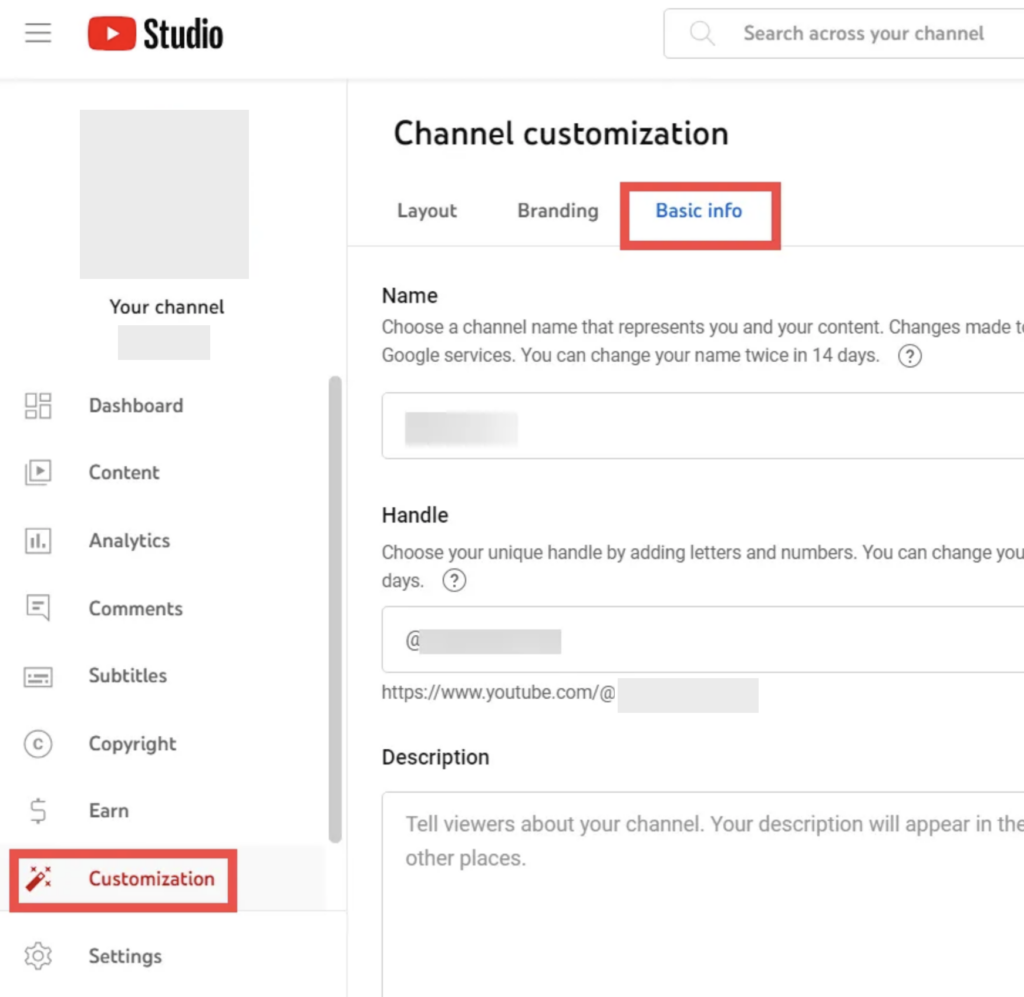
Once done, click on the button PUBLISH for the changes to take effect.
High-Quality Content is Key
Once your channel is set up, content becomes the key to growth.
Good content is not just about quality.
It is about keeping people interested.
You want viewers to:
- Click your video
- Watch it for longer
- Come back for more
That is what helps your channel grow.
Step 1 – Choose the Right Topics and Keywords for Your YouTube Videos
Before you make a video, you need a topic.
You also need to understand what people are searching for. These search terms are called keywords.
When you use the right keywords, YouTube can better understand your content. This can help your videos appear in search results and recommendations.
Below are some tools you can utilize to find keywords for your YouTube videos and tailor them for your target audience:
- YouTube Search
When doing keyword research for YouTube, you can directly type potential keywords into the YouTube search bar and you should see a list of automated suggestions. Here we suggest you sign out of YouTube.
“These are called search predictions. These predictions come from possible search terms related to what you’re looking for and what other people have already searched for.“
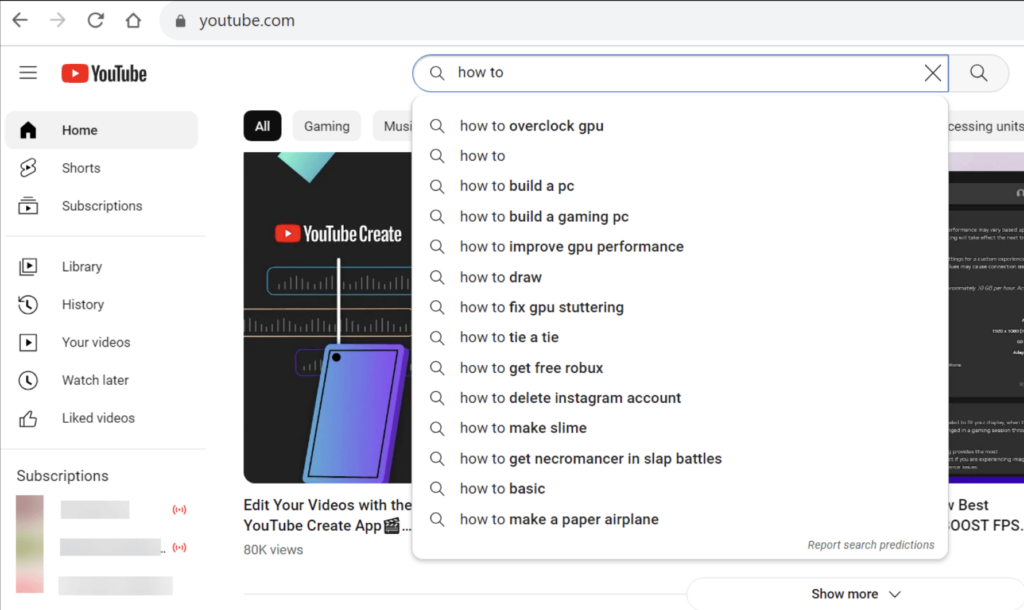
After inputting the whole phrase, check the search results that show the current videos that rank for that keyword. Browse those videos to analyze how optimized they are for the keyword. Check the keywords in their title, description, and tags.
- Google Trends
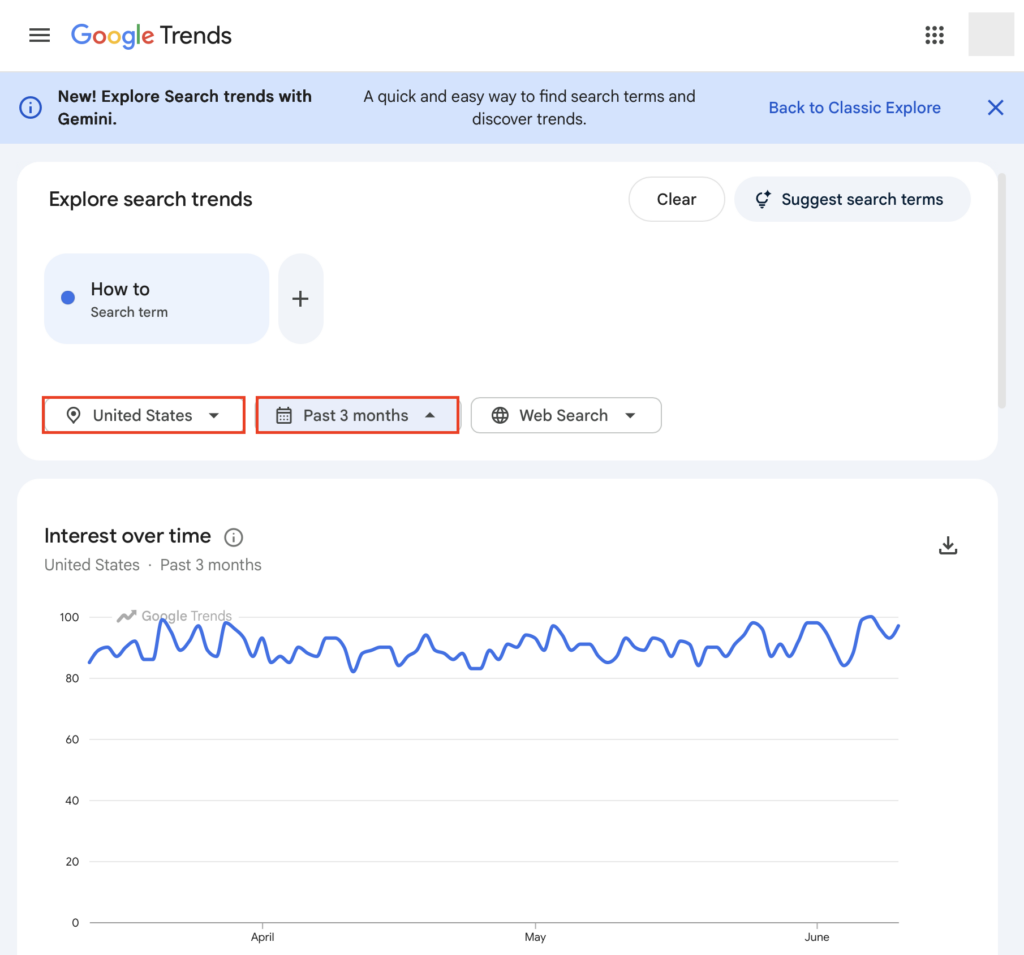
Yep, you read that right. Google Trends again! It is a free tool from Google that allows you to analyze search volume patterns and trends for keywords and topics over time.
What you have to do is enter some words into Google Trends. For example, if you plan to make how-to videos, you could input terms like “how to”. You can select a specific country, customized time frame, or category. When you hit Enter, Google Trends will then display a graph showing the search volume trends for the terms, as well as other keyword ideas.
- Keyword Planner
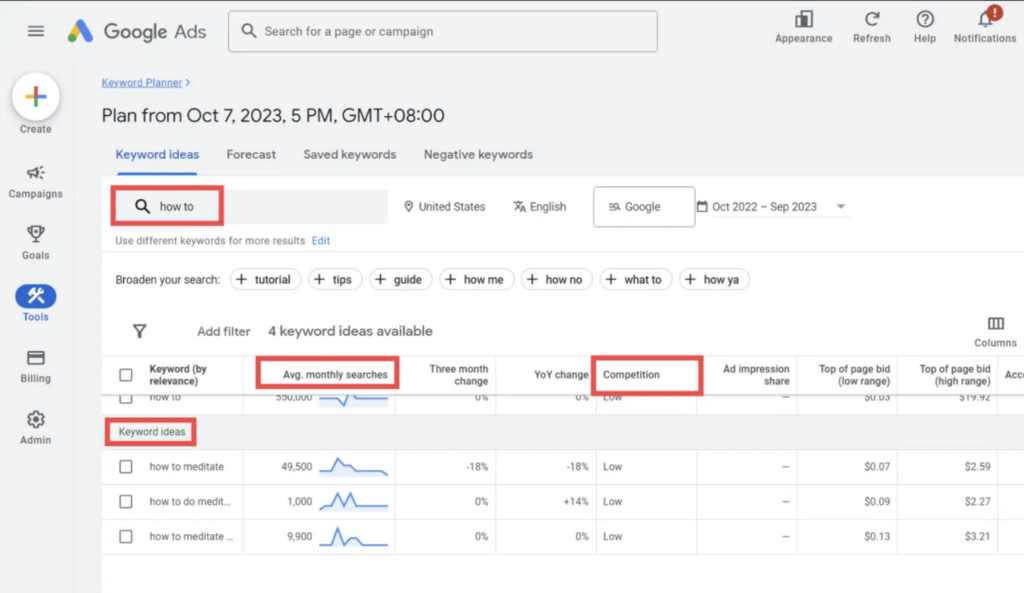
Google’s Keyword Planner provides useful data on search volume and keyword ideas that can inform keyword selection for your YouTube videos. It generates related keywords and long-tail variations around your initial inputs. It also displays competition metrics.
- Semrush Keyword Analytics for YouTube
This is a paid tool, but you can take advantage of its free trial.
The key features Semrush keyword analytics for YouTube provides for researching and analyzing keywords include:
– Keyword competitive rate
Rates keywords on a 0-100 scale based on competition, allowing you to identify easier keywords to target.
– Search volume data
Shows daily/weekly/monthly searches for any keyword so that you can quantify traffic potential.
– Keyword ideas
Generates some long-tail keyword suggestions related to your seed keywords.
– Most viewed videos
Shows the top-ranking and most-viewed YouTube videos for any given keyword you input.
Step 2 – Make High-Quality Videos for YouTube
Once you choose a topic, it is time to create your video.
- Camera recordings
Good production quality can improve viewer experience, but you do not need expensive equipment to start. Many successful creators begin with a smartphone, basic lighting, and clear audio before upgrading over time. What matters most is clarity and value.
If your budget allows, cameras from brands like Sony, Canon, or Nikon may offer additional flexibility for higher-quality production.
- Screen recordings
You might be working on troubleshooting guides, gaming walkthroughs, or other how-to explanations. The screen recordings can be effective.
To create high-quality screen recordings, use dedicated screen recording software like OBS Studio. Set an appropriate resolution like 1080p. A frame rate of 30 fps or 60 fps is recommended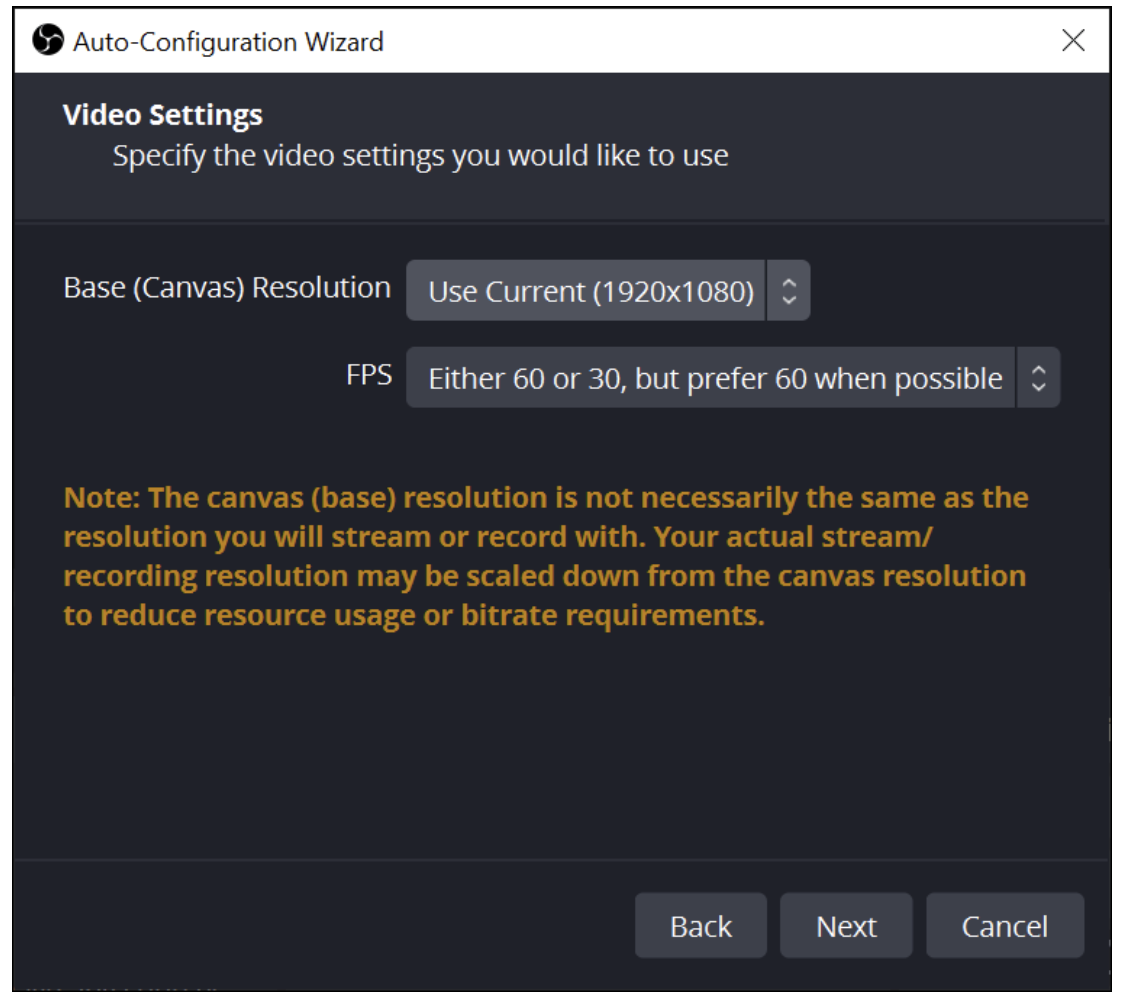
To reduce lag, close unnecessary programs and browser tabs before recording. When editing your recorded videos, use text overlays, graphics, zooms, and cuts to highlight key information to viewers. - Animated explainers
Animated explainers work well when you need to clearly explain complex topics, tell an engaging brand story, or make dry subjects more entertaining.
To create effective animated explainers for YouTube videos, utilize software like Vyond.
Step 3 – Basic YouTube SEO
After uploading your video, you still need to help people find it. This is where YouTube SEO comes in. It includes your titles, descriptions and thumbnails.
Follow these best practices:
- Optimize your video titles
Your title should be clear and specific. It should tell viewers what the video is about. You can include keywords, but do not overdo it. - Craft descriptive descriptions
Your description should explain your video. Keep it clear and natural.
You can include keywords, but always write for humans first. - Create custom thumbnails
“Video thumbnails let your audience view a quick snapshot of your video. You can choose from the options YouTube automatically generates, or upload your own if your account is verified. “
Thumbnails, as well as titles, are the elements that are often the first impression potential viewers have of your content. A good thumbnail should be clear, easy to read and it should match your video content. Avoid clutter. Keep it simple and bold.
Or use a high-quality image relevant to your video topic. Canva can be one of the great resources for images. - Use Tags (Optional)
Tags can still help YouTube understand your content. But they are not a major ranking factor anymore.
Instead, you should focus more on your title, thumbnail, and watch time.
If you want to make changes to the titles, descriptions, thumbnails, and tags of the video you have published, simply select Content from the left menu. Under the Videos, select the video you want to make adjustments to and click on the Details icon. - Check Your Performance
Now you’ve published your videos. Next, you need to regularly track vital metrics like views, watch time, audience engagement (comments), and subscribers to your channel.
YouTube Analytics is the gateway to finding a wealth of data and understanding your audience. Select Analytics from the left menu, and you should see an overview. To view details, go to Content.
How to leverage YouTube Analytics for channel success?
The first step is to keep a close eye on each metric, as well as audience retention. Look for patterns and trends. Then identify your most popular videos and analyze what sets them apart. If you find that certain video elements consistently perform well, replicate them in your new content. Conversely, make changes accordingly.
And interaction matters. When necessary, respond to comments and consider viewer feedback.
2. Join the YouTube Partner Program (YPP)
Once your channel starts growing, you can apply for the YouTube Partner Program.
This is the main way creators earn money directly from YouTube.
But you do not need it to start a channel. You only need it when you want to monetize your content.
What the YouTube Partner Program does
When you join YPP, you unlock monetization features. This includes:
- Ad revenue from videos
- Revenue from Shorts
- Channel memberships
- Super Chat and Super Thanks
- Shopping features (in supported regions)
These tools allow you to earn in different ways. Not just ads.
Am I Eligible?
YouTube has different levels of monetization access. These requirements may change over time, but generally:
Tier 1: Early Access (Unlock fan funding like Supers, Memberships, and Shopping)
- Around 500 subscribers
- At least 3 public uploads in the last 90 days
- And either:
- 3,000 watch hours in the past 12 months
- OR 3 million Shorts views in the past 90 days
Tier 2: Full Access (Unlock Ad Revenue from the Watch Page and Shorts Feed)
- Around 1,000 subscribers
- And either:
- 4,000 watch hours in the past 12 months
- OR 10 million Shorts views in the past 90 days
You should always check YouTube’s official page for the latest requirements, as they can change.
If you’re not currently qualified, no worries! Continue to grow your YouTube channel. And you can take a simple step to get notified when you’re eligible.
How to apply when you are eligible
Once you meet the requirements, you can apply in YouTube Studio.
Here is how:
1) Sign in to YouTube.
2) In the top right, click on your profile picture. Then select YouTube Studio.
3) In the left menu, click Earn. Scroll down until you see the section How do I join?. From there, you should see the button EMAIL ME. Click on it.
You’ll get an email once you’ve met either of the aforementioned eligibility thresholds.
How creators earn money in YPP
Once you are accepted, you can start earning in different ways.
1. Ad revenue
You earn money when ads appear on your videos or Shorts. The exact revenue split depends on content type and YouTube policies.
2. Channel memberships
Viewers can pay a monthly fee to support your channel.
In return, they may get perks like exclusive content badges and custom emojis.
3. Super features (Live + Videos)
Viewers can send paid messages during live streams or videos, including Super Chat, Super Stickers and Super Thanks.
This works best when you have an active and engaged audience.
4. Shopping features
In some regions, you can tag products or connect a store.
This allows viewers to discover and buy products directly.
Turning on monetization features
Once approved, you can manage monetization in YouTube Studio.
To enable ads:
- Go to YouTube Studio
- Open “Content”
- Select a video
- Click “Monetization”
- Choose ad settings
- Save changes
For other features like memberships or Supers, you can activate them in the “Earn” section when eligible.
3. Sell Custom Merchandise
Once your channel has an audience, you can sell your own products. This is called merchandise, or “merch”. You are basically turning your brand into products.
Unlike the YouTube Partner Program, selling custom merchandise to your audience to make money has no eligibility criteria. But it would be better after your YouTube channel gains sizable viewership. Products can include T-shirts, hoodies, mugs, phone cases, and others.
You can design branded merchandise featuring your channel’s logo or characters. These are then sold through platforms like Spring (formerly known as Teespring), Merch by Amazon, or Shopify.
To display and promote your merchandise, you can mention your merch store in the description box under all your videos. The integration on some platforms may also allow you to add a merch shelf below videos.
You can also feature it across the top of your YouTube channel’s homepage.
4. Use Affiliate Marketing Links
Affiliate marketing is another way to earn money. You recommend products. When people buy through your link, you earn a commission.
Note that these affiliate links are for any company’s products across the internet, not just those tagged through YouTube shopping.
As a YouTuber, you can join affiliate programs like Amazon Associates, eBay Partners, ShareASale etc. related to your niche. Find the products you want to promote and get the unique affiliate links. In your video descriptions, mention the products and include the affiliate links. If viewers click on the links and buy the products. you’ll earn a commission.
Below is an example.
5. Get Paid Brand Sponsorship Deals
Brand sponsorships are one of the main income sources for many creators.
This is when a company pays you to promote their product or service. Usually, rates are negotiated based on your channel stats and demographics.
To get sponsorships for your YouTube videos, you should:
- Create high-quality content and build up your subscriber base and views
Brands want to sponsor creators with big engaged audiences in their target demographic. - Identify relevant brands
Try to research companies in your niche that would resonate with your audience and content style. - Reach out for partnerships
Email sponsorship inquiries and contact brand marketing teams. You can usually find contact information from the contact page or page for affiliate marketing from a brand’s official website. For example, you can easily find the contact information on Wondershare’s Contact Us page. - Pitch effectively
In your email or messages sent to them, you should present your value proposition, channel analytics, successful case studies, and custom integration ideas.
After you get their replies, negotiate the sponsorship deals that are beneficial for both parties. When everything is settled down, work on your content.
6. Live Stream to Boost Supers
Live streaming is another way to earn money on YouTube. It also helps you connect with your audience in real time.
What are Supers?
Supers are paid features during live streams, such as Super Chat, Super Stickers and Super Thanks.
Viewers can pay to highlight their messages or support you.
To effectively earn more from Supers with live streaming, there are some practices to follow:
- Stream on a consistent schedule so viewers know when to watch and make time for your live broadcasts.
- Strategically promote your upcoming streams on YouTube, social media, and in your videos to maximize live viewership.
- Actively interact with viewers during streams by inviting Super Chats on hot topics, thanking supporters, and reacting to comments in real time.
To see revenue reports for Supers, go to YouTube Analytics > Revenue > How you make money.
Making money on YouTube is possible, but it is not instant. If you are just starting, focus on building a strong foundation. Choose a clear niche. Create useful and engaging content. And learn what your audience actually enjoys.
As your channel grows, you can explore different income streams.
Leave a Reply