

Have you ever received an email from an unfamiliar address and wondered who was behind it? Whether you’re trying to verify a contact, avoid scams, or reconnect with someone, tracing the owner of an email address can feel overwhelming if you don’t know where to start.
The good news is that there are several effective ways to perform a reverse email search, and many of them are free. In this guide, we’ll walk you through practical methods, tools, and tips to help you uncover useful information step by step. Let’s get started.
1. Analyze the Email for Clues
Before turning to external tools, start with the email itself. You’d be surprised how much information is often hiding in plain sight.
- Check the Email address
Some email accounts are configured to show the sender’s name along with the email address. If this is the case, you may instantly get a first and last name, or at least a username, giving you a valuable starting point. - Check the domain name
The domain (the part after the “@”) can tell you a lot. If the email comes from a custom domain (for example,@companyname.com), it’s likely tied to a business or organization. You can visit the company’s website or contact the domain owner to ask for assistance.
Keep in mind that this approach won’t work for public email providers like Gmail, Yahoo, or Outlook. - Find Email Signature:
Many people include signatures at the bottom of their emails with details such as their name, job title, company, phone number, or social media links. Always scroll to the bottom of the message to see if you can find any clues there.
2. Epieos
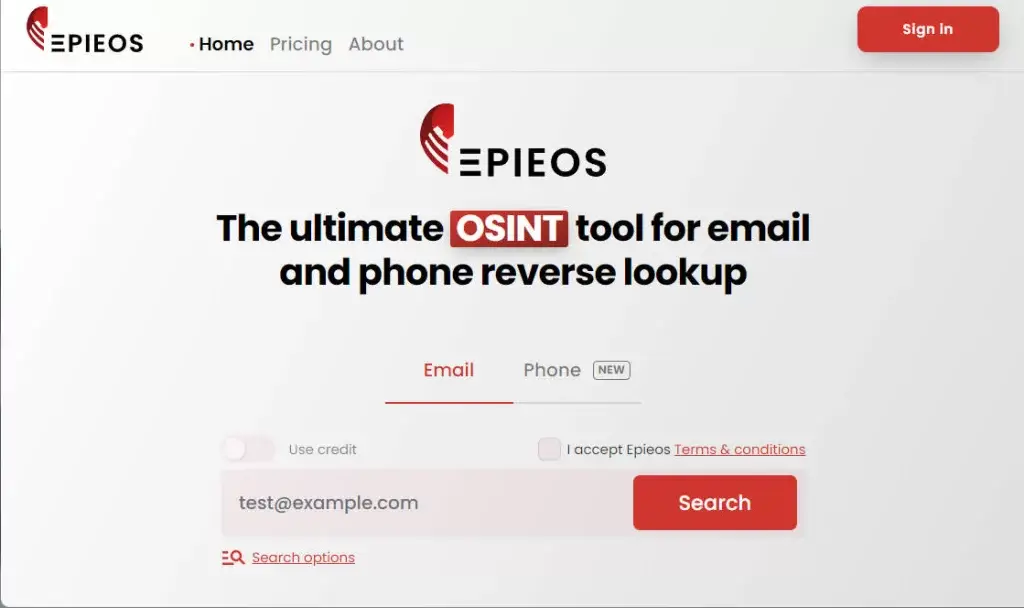
Epieos is a popular Open Source Intelligence (OSINT) tool that offers free email and phone number lookups.
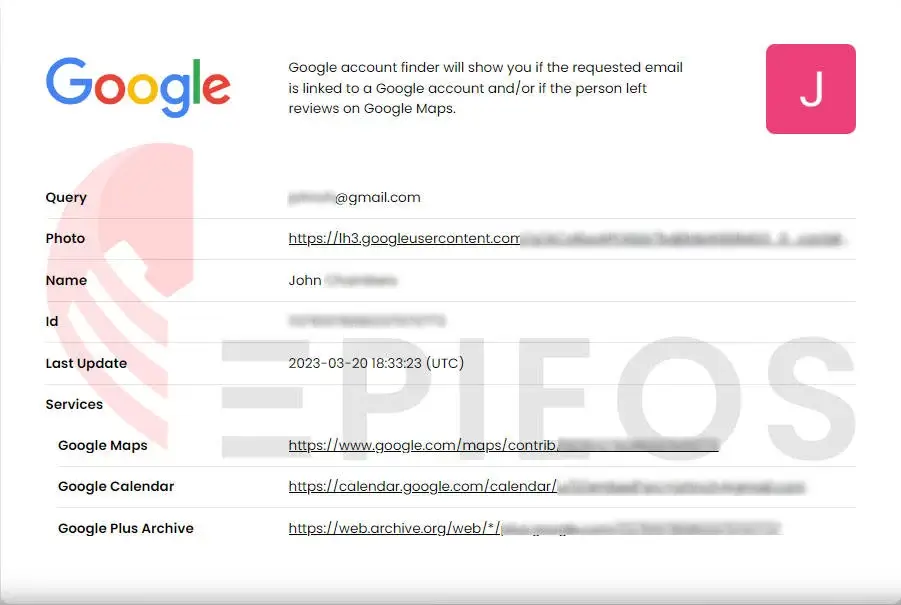
Its email lookup tool helps you verify if the email is linked to a Google account and if the person has left reviews on Google Maps. Additionally, it shows social platforms where the email address is registered.
Here is how to use this tool:
- Go to the Epieos website.
- Fill in the email address in the search bar and check the “I accept to Terms & conditions” checkbox.
- Then click Search.
For free users, Epieos typically reveals the name and profile picture associated with the email, along with a list of platforms where the email has been used. However, detailed profile links and additional data are blurred unless you upgrade to a paid plan.
3. Search Profiles Linked to the Email Manually
Many social media platforms allow accounts to be linked to email addresses. If privacy settings permit, you may be able to find the owner’s profile. And with this information, you might dig out their name, location, and other personal details.
Facebook is the biggest social network worldwide, boasting a daily active user of more than 1 billion, so the chances that the email owner has a profile on this platform are quite high. And the best about it? – Facebook lets you search directly on the website using email addresses. Here is how to do it:
1. Go to Facebook or open the app.
2. In the search bar, type the email address and press Enter.
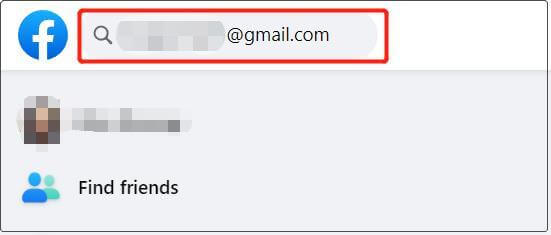
This method only works when the email address owner connects the particular email address to their account and has the email address listed as public. If you can’t find any profile through this, don’t worry; there are other options.
LinkedIn is often the most reliable platform for finding accurate personal information authentic personal information (e.g., full name, job history, education, etc.). Profiles usually include real names, work history, education, and professional connections.
Although LinkedIn doesn’t support direct email searches, there’s a workaround using Microsoft Outlook.
1. Go to Outlook and log in to your account.
2. Click the People option on the left panel, then click New contact.
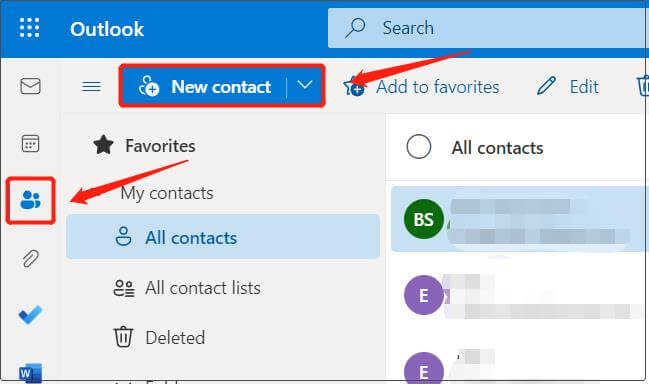
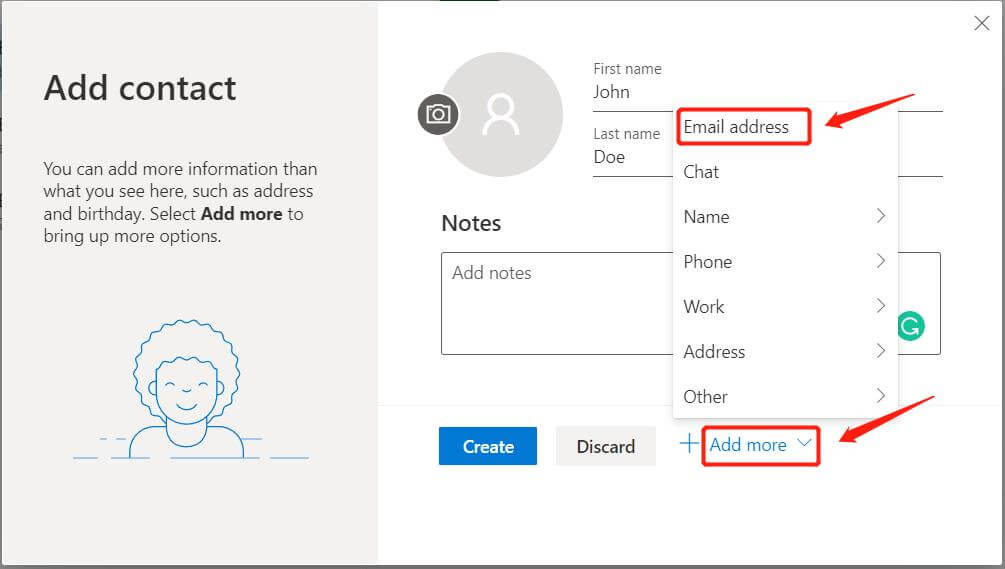
3. Fill in the First Name as you want, then click Add more and select Email address.
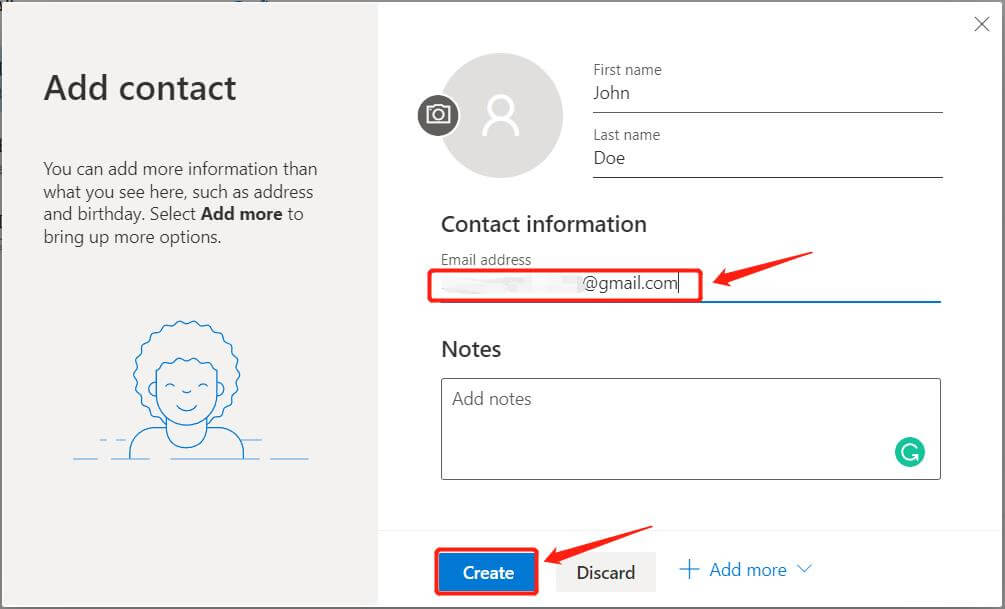
4. Fill in the email address and click Create.
5. Click the contact you created, then click LinkedIn to see if there’s any LinkedIn profile associated with the email address. (You’ll need to log in to your LinkedIn account and connect it to your Microsoft Outlook account if you haven’t done this yet.)
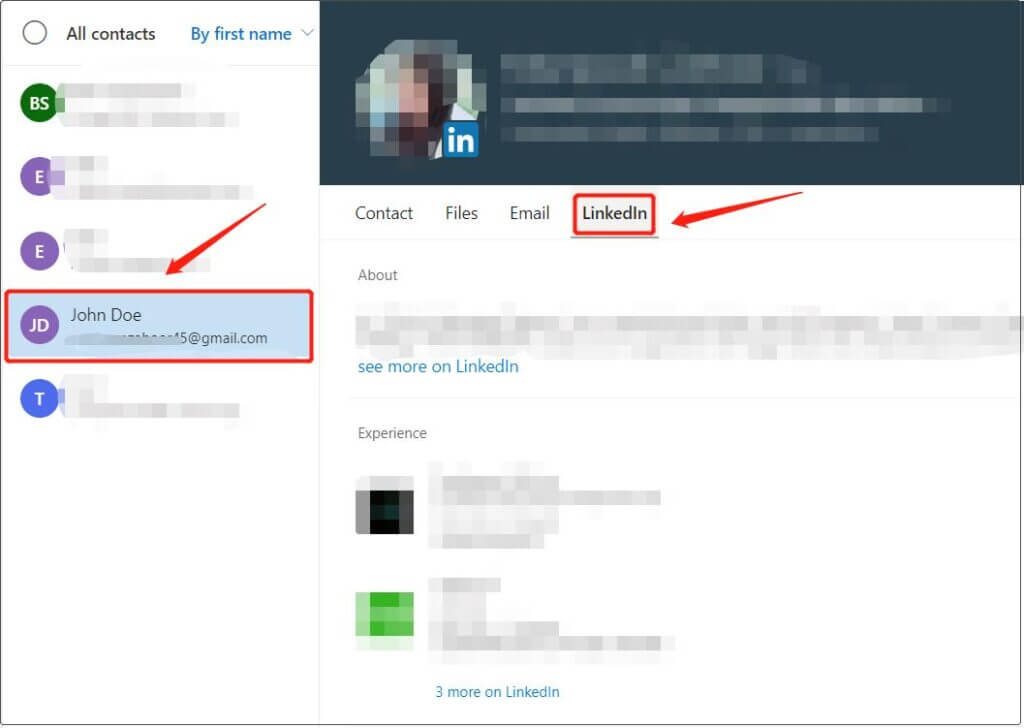
Depending on users’ privacy settings, their profile information may be viewable only to people they’ve connected with or it may be viewable to anyone.
If there’s no profile shown, that means no LinkedIn account is connected to that particular email address. In this case, move on and try if you can get any luck on Twitter.
Same as LinkedIn, Twitter doesn’t allow you to directly search for users by email address. But here’s the workaround for this site: you can import your email contacts to Twitter, and it will use them as suggestions for who to follow, and voilà – the Twitter page registered with that email address will be available to you. Here’s how to do it:
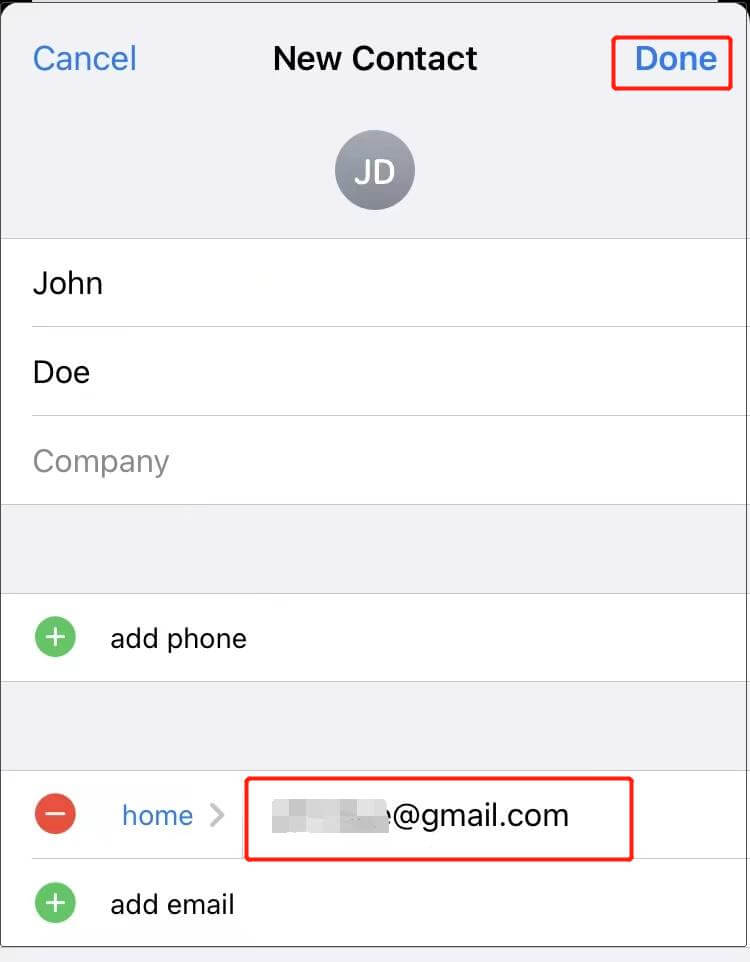
1. Add the email to your phone contact. (You can do this by going to Contacts, clicking Add, and filling in the first name as you want, along with the email address. Depending on your phone’s operating system, the process varies.)
2. Log in to the Twitter app.
3. Go to Menu > More > Settings and Privacy > Privacy and safety > Discoverability and Contacts.
4. Turn on Sync address book contacts and grant Twitter permission to access your contacts.
You’ll be able to find Twitter profiles associated with email addresses on your Contact if the owners have allowed other people to find them by their email address.
4. People Search Tools
Another way to look up email addresses is to use people search engines. People search engines are designed to gather and aggregate information from publicly available sources, including social media platforms, public records, government databases, and others. They focus solely on finding information on specific individuals.
There are both free and paid people search tools. Starting with free services like TruePeopleSearch. Free tools usually provides the basic information, such as names, phone numbers, and addresses. If you require a more detailed background report, clicking on the “View Full Background Report” button will redirect you to paid services.
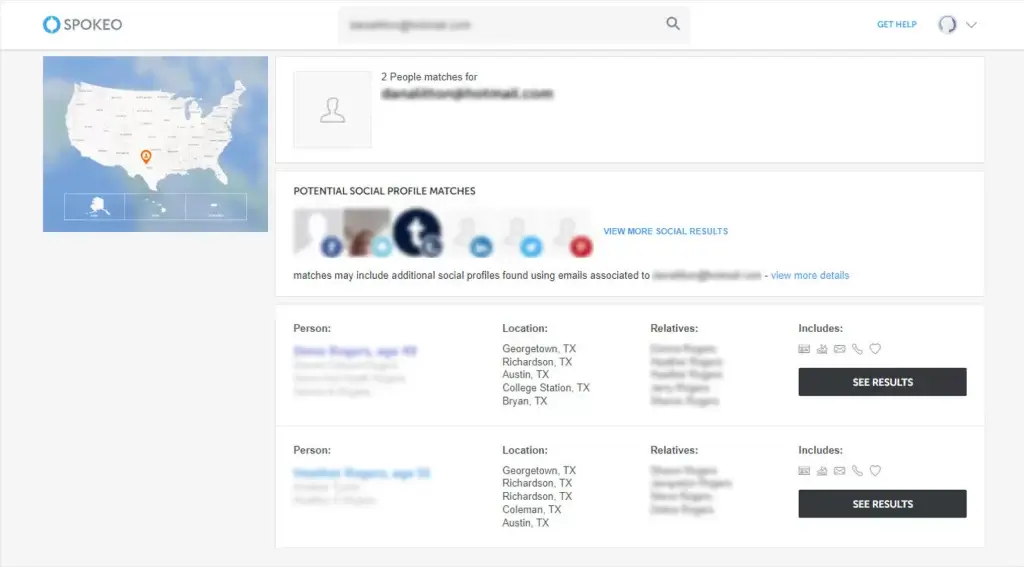
If you’re willing to spend a little money, paid tools like Spokeo offer more comprehensive background reports, including social profiles, employment history, and additional contact details.
Final Thoughts
Finding the owner of an email address isn’t always easy, especially when some email addresses are intentionally designed to remain untraceable.
If you’ve tried these techniques without success, it may be best to stop your search and move on. Sometimes, the lack of information is a sign that the sender values anonymity, and continuing further may not be worth the time or effort.
Leave a Reply