

You meet someone new. Or you match with someone online. And the first thing you think is: “I wonder what they’re like online.”
Sometimes what people post says more about them than what they say in real life. Their hobbies, opinions, even who they hang out with. It’s all there if you know where to look.
If you already have a username, you’re actually in a great position. With a reverse username lookup, you can often trace that name across multiple platforms and get a much clearer picture of who you’re dealing with. Let me walk you through how this works and which tools are actually worth your time.
What’s the best reverse username lookup?
Short answer? There isn’t just one.
Different tools search different corners of the internet, so results can vary even if you type in the exact same username. That’s why it’s smart to use more than one tool.
We’ll start with the best free options, then move into paid tools if you want deeper results.
Our favorite free tools are: WhatsMyName, Instant Username Search, and UserSearcher. These tools help you find social media accounts using a specific username. Since people often use the same username across different platforms, these tools might help you locate their other accounts. Paid tools usually offer more detailed information. If you’re serious on finding the information, try Social Catfish or Spokeo.
1. WhatsMyName
WhatsMyName lets you search for a username across various websites, including social media networks, dating platforms, and chat sites. If the person has created profiles using the same username, this tool should find them.
To use WhatsMyName, enter the username into the search box and click the search icon.
You’ll see a list of links to social media profiles using that username. From there, you click through each profile and see if anything lines up. If you can spot the same photos, interests, or writing style, that might be a sign that you’ve found the right person.

2. Instant Username Search
Instant Username Search is a powerful tool that checks over 100 social media networks for profiles using the searched username. While it doesn’t cover as many websites as WhatsMyName, it includes some unique ones.
To use Instant Username Search, enter the username, and the results will appear as you type. If you see “Taken” under the social media network’s name, that means a profile with that username exists there. Click the social media name to visit the profile and see if it belongs to the person you’re looking for.

One thing to keep in mind: it’s not perfect. In our tests, it missed some profiles that other tools found. Still, it’s worth running if you’re trying to be thorough.
3. User Searcher
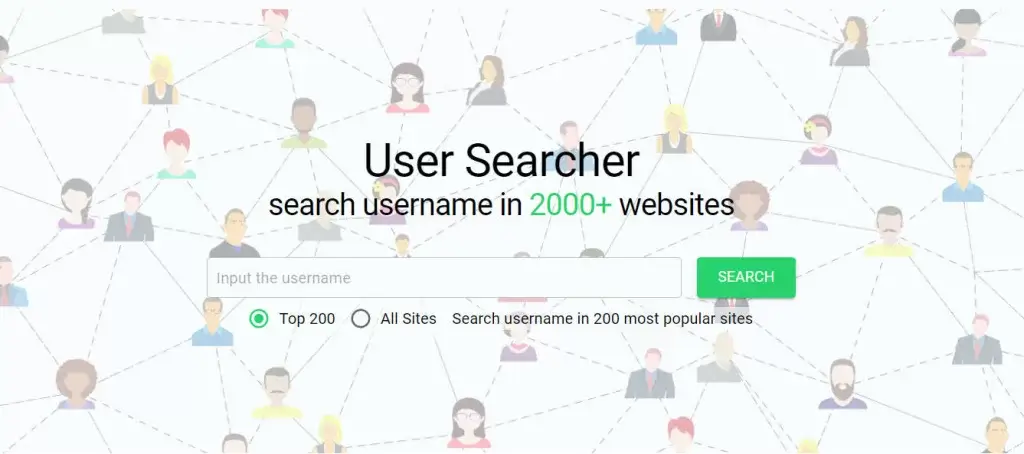
UserSearcher is another free tool that searches through over 2,000 websites, including social networks, dating sites, and crypto forums. However, during our test, it failed to locate some Instagram profiles that other tools could find.
Enter the username and click SEARCH. By default, the tool searches the most popular 200 sites. To search all 2,000+ sites, select All Sites.
Note that just because a username exists doesn’t mean it belongs to your subject. You need to verify the results on your own, looking at profile photos, bio details and comparing posts. If you want something faster and more consolidated, consider using a paid people search tool.
4. Social Catfish
Social Catfish is a one-stop shop for finding a person’s online presence without extensive searching.
Instead of clicking through dozens of profiles, you enter a username and let the tool do the digging. It pulls from public records and social platforms to build a report that may include:
Social Catfish’s report may include contact details, social media profiles, images, criminal records, and more. A membership is needed to unlock the full report.

During our test, the results can vary; some reports are incredibly detailed, while others may lack information. As with other tools, you might have fewer search results if your subject is below 18 years old because younger people typically have fewer public records. Additionally, some people request to have their records suppressed, so not everyone can be found using such services.
5. Spokeo
Spokeo is a people search service that has an extensive collection of social media and dating site profiles. Its reverse username lookup tool searches people’s online presence through 120+ social networks, allowing you to find in-depth information about anyone.
To search for someone using a username, go to Spokeo and enter the username into the search bar. Spokeo will search through billions of public records and major social networks and compile the information it finds into one easy-to-read report.

If you’re a new customer, you can get Spokeo’s trial membership for only $0.95. Keep in mind that you need to cancel the membership before the trial ends; otherwise, you’ll be automatically billed $29.95 per month.
How do reverse username lookups work?
At its core, it’s pretty simple.
You enter the username into the tool’s search field and start the search. The tool searches through social networks for profiles using that username.
You can then review their posts and comments to determine if it’s the person you’re looking for. This might require some time as you need to manually check each profile, but there are many free tools that you can try.
Free tools require more manual checking. Paid tools save time by pulling everything into one place, but they’re still limited to what’s publicly available.
When would I use a reverse username lookup?
There are many scenarios where you might want to run a reverse lookup on a username, such as:
- Investigating cybercrime:
If you or your friends are dealing with online harassment, stalking, or cyberbullying, you might want to use a reverse username lookup to identify the person behind the attack. - Online dating:
Before meeting someone from an online dating site, you might want to verify their identity and check if their profile information matches their online behavior. A reverse username lookup can provide some insight into this. Or, in some cases, you just want to learn more about the person to make sure you have something in common. - Reconnecting with friends:
You might want to reconnect with old friends and find their active accounts on social media.
Final thoughts
Reverse username lookups won’t tell you everything about a person, but they can tell you a lot.
Start with free tools and make sure you cross-check your results. If you’re willing to pay and you need deeper insight, try a dedicated people search tool.
If you’ve used any of these tools before or found one that worked surprisingly well, I’d love to hear about it. Drop a comment and share your experience.
Leave a Reply